Cybersecurity student and IT support professional. These five projects show how I segment networks, harden systems, assess vulnerabilities, and plan incident response, with the evidence from each lab.
B.S. Cybersecurity · SNHU · Nov 2026CompTIA Security+ (SY0-701) · in progress4+ yrs technical & banking support
A small office ran every department on one flat network, with servers mixed in among user PCs. I rebuilt it into isolated segments behind an edge firewall, and in a separate assessment audited an Active Directory domain and traced a connectivity failure.
What I did
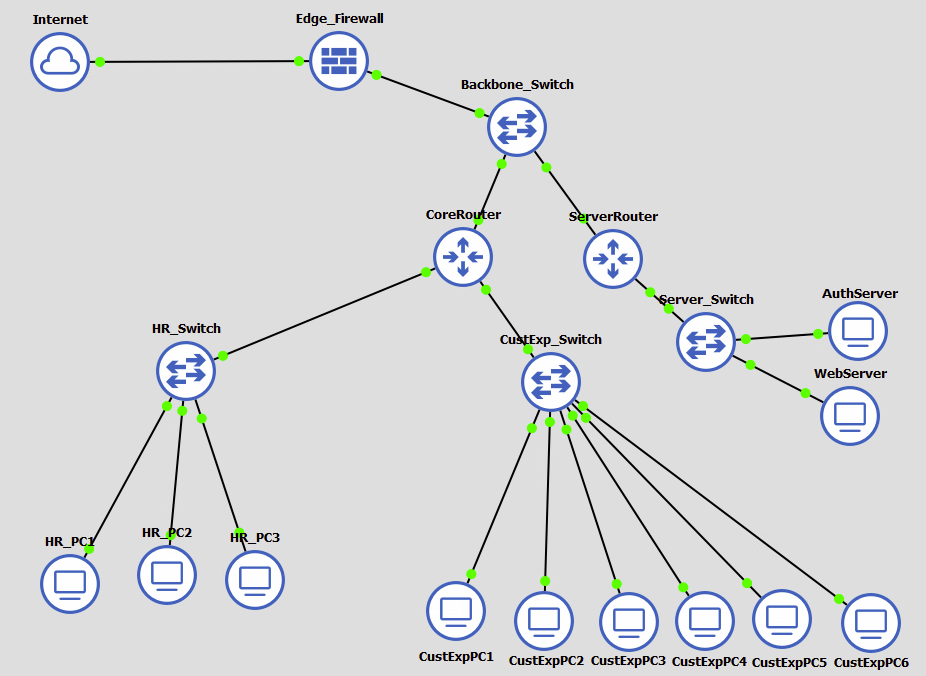
Redesigned the topology in GNS3 around a backbone switch, a core router for user departments, and a dedicated server router.
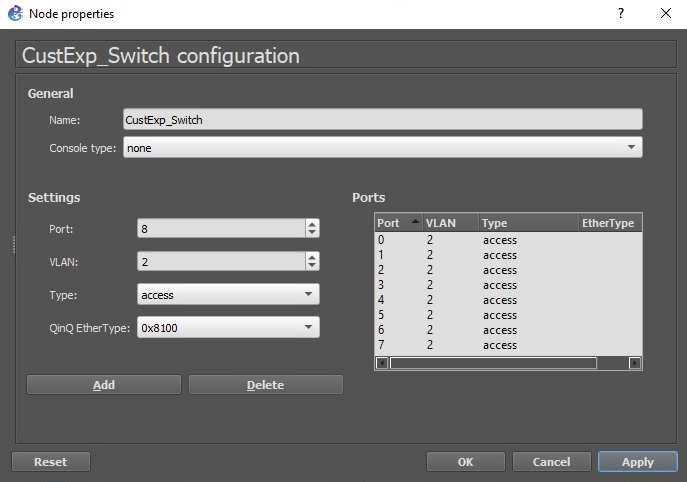
Assigned each department its own VLAN: Customer Experience on VLAN 2, HR on VLAN 3, and the web and authentication servers on VLAN 4.
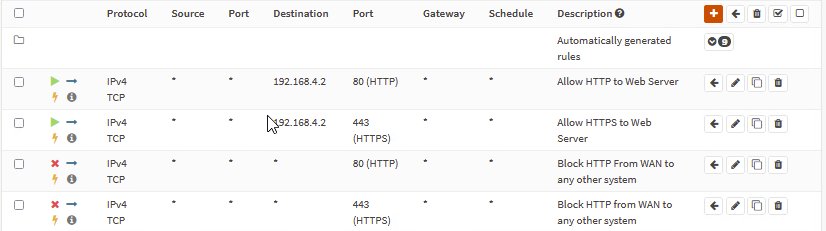
Wrote OPNsense WAN rules that allow only HTTP and HTTPS to the web server at 192.168.4.2 and block those ports to every other host, ordered for first-match evaluation.
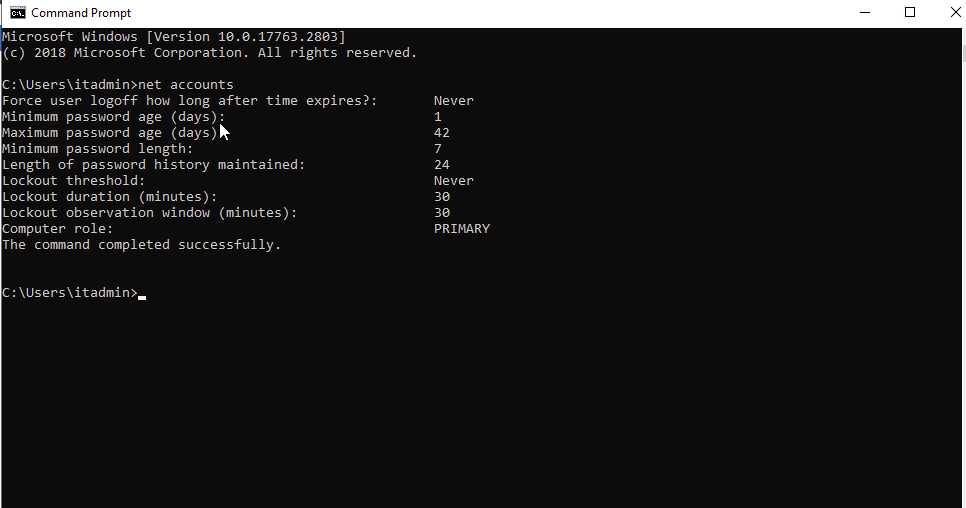
Ran net accounts on a domain controller and found a 7-character minimum password, a 42-day maximum age, and no account lockout.
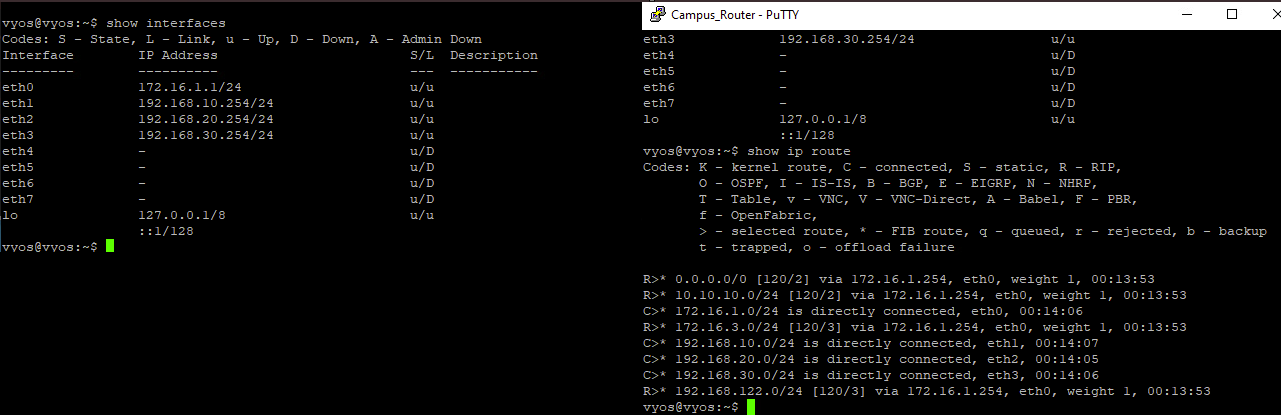
Traced an inter-subnet outage: hosts reached their own gateway, and the router's interfaces and routing table were correct, which pointed to a filtering rule blocking traffic after routing.
#
Action
Destination
Port
Purpose
1
Allow
192.168.4.2
80
HTTP to web server
2
Allow
192.168.4.2
443
HTTPS to web server
3
Block
any
80
HTTP to every other system
4
Block
any
443
HTTPS to every other system
Fig. 1Reconfigured topology in GNS3, with the server zone on its own router.Fig. 2The four WAN rules as configured in OPNsense.Fig. 3Customer Experience switch ports assigned to VLAN 2.Fig. 4Domain password policy audit with net accounts.Fig. 5Router interfaces and routes confirmed valid while troubleshooting.
Result
Departments can no longer reach each other or the servers directly, and only the web server is exposed to the internet. For the domain, I recommended a 12 to 14 character minimum, complexity and history requirements, and lockout after five failed attempts.
CYB 300 · System and Communication SecurityFebruary 2026Hands-on lab
Linux Hardening Script and Certificate Authority
Relocated systems needed the same baseline security settings applied quickly and consistently. I automated the baseline in one Bash script and built a root certificate authority so systems could be issued trusted certificates.
What I did
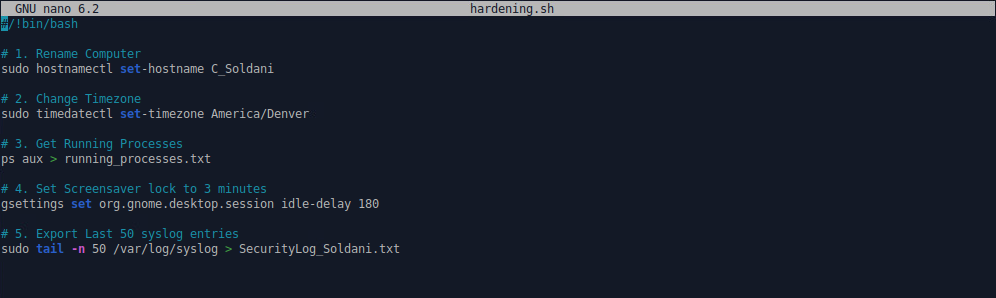
Wrote a single executable Bash script on Ubuntu 22.04 that sets the hostname and time zone, exports running processes, sets a 3-minute idle lock, and exports the last 50 syslog entries to a security log.
Verified every change from the terminal after the script ran.
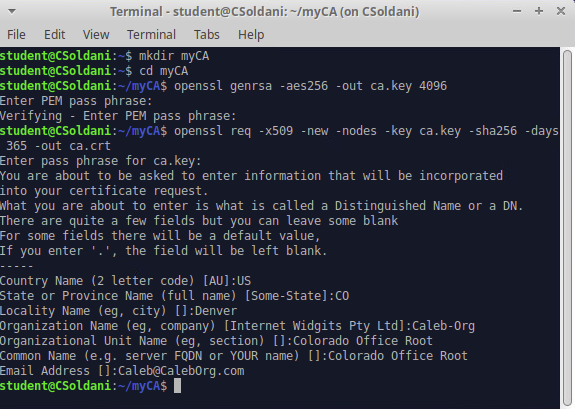
Generated an AES-256 encrypted 4096-bit private key with OpenSSL and created a self-signed root certificate with SHA-256, valid for one year.
Documented how certificate signing requests flow from a host to the CA and back.
#!/bin/bash# 1. Rename computer
sudo hostnamectl set-hostname C_Soldani
# 2. Change time zone
sudo timedatectl set-timezone America/Denver
# 3. Get running processes
ps aux > running_processes.txt
# 4. Set screensaver lock to 3 minutes
gsettings set org.gnome.desktop.session idle-delay 180
# 5. Export last 50 syslog entries
sudo tail -n 50 /var/log/syslog > SecurityLog_Soldani.txt
Fig. 6The script in nano on the lab VM.Fig. 7Creating the CA key and root certificate in OpenSSL.
Result
One command applies a repeatable baseline to any relocated system, which removes manual setup errors and gives auditors a record of exactly which controls were applied.
BashUbuntu 22.04OpenSSLPKIVMware
CYB 400 · Security Assessment and AuditingJune 2026Analysis
Vulnerability Assessment and Remediation Plan
A network vulnerability scan returned findings ranging from critical remote code execution to low-risk information leaks. I sorted them into a phased remediation plan by severity and by how quickly each could realistically be fixed.
Finding
CVSS
Phase
Remediation
SMB brute-force logins with default guest credentials (5 instances)
9.0
Scheduled maintenance
Disable or reset default accounts, enforce NIST SP 800-63B passwords, restrict SMB with host firewalls
Cleartext transmission of sensitive data over HTTP
—
Policy update
Require TLS 1.2 or 1.3 and an HSTS policy
DCE/RPC and MSRPC service enumeration
—
Policy update
Block port 135 and dynamic RPC ports at the perimeter, restrict internally
Microsoft Windows SMB Server NTLM vulnerabilities (MS10-012)
10.0
Longer-term
Test and deploy the MS10-012 patch, enforce NTLMv2 by Group Policy in the meantime, rescan
SSL/TLS weak cipher suites
4.3
Longer-term
Disable RC4, DES, and 3DES, prefer ECDHE with AES-256, retire SSL 3.0 and TLS 1.0/1.1
Result
I recommended fixing the default SMB credentials first. They score 9.0, need no patching or downtime, and can be closed in a single maintenance window, which shuts the easiest entry points while the harder patches are tested.
CVSSNIST SP 800-63BTLS hardeningGroup Policy
CYB 320 · Incident Response and InvestigationAugust 2026Response plan
Ransomware Incident Response Plan
A finance workstation displayed a ransom note and users could not open shared financial files. Two departments that were meant to be segmented were not, and backups ran only monthly. I wrote the response and recovery plan following NIST SP 800-61.
ContainDisconnect the infected workstation from the network without powering it off, to preserve volatile evidence. Disable its user account and mapped drives.
ScopeSweep endpoints for the same encryption behavior, starting with the departments that were not actually segmented.
Protect backupsConfirm the local backup was not reached, then disconnect it or make it read-only.
RecoverIdentify the strain and check No More Ransom for a free decryptor; otherwise restore from backup and rebuild infected machines from a clean image.
HardenFix and verify segmentation before reconnecting anything, deploy behavioral endpoint protection, require MFA on remote access, and tighten file share permissions.
Keep the business runningMove payments and payroll to manual workarounds during recovery, and plan a warm site or cloud failover for Finance.
CYB 420 · Enterprise SecurityOctober 2026Assessment and redesign
Enterprise Security Assessment
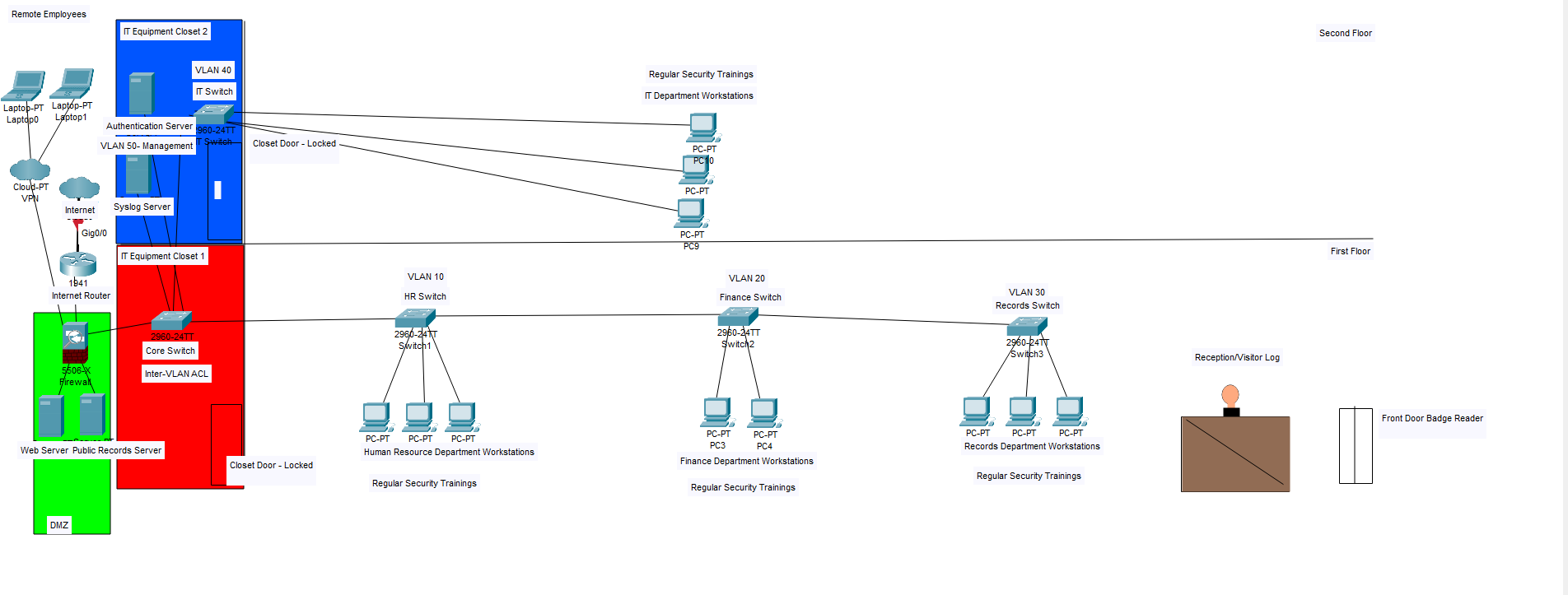
A company preparing for federal contracts had open IT closets, hubs on the network, no firewall, and no logging. I assessed it across people, process, and technology and redesigned the network in Packet Tracer, aligned to the NIST Cybersecurity Framework and SP 800-53.